
Electromagnetic fields (EMFs) are everywhere in modern homes – radiating from Wi-Fi routers, smart meters, televisions, and even the wiring inside walls. While you can’t eliminate EMFs completely, you can take meaningful steps to lower your exposure. One of the simplest and most cost-effective strategies is how to arrange furniture to reduce EMF exposure. The way you set up your bed, couch, desk, and even bookshelves can make a noticeable difference in how much radiation your body absorbs daily.
This article will walk you through why layout matters, which rooms need the most attention, and specific furniture placement strategies to create a safer, calmer living environment. You’ll also learn how to combine these methods with simple shielding solutions for maximum protection – all without costly remodeling.
Why Furniture Placement Matters for EMF Exposure
Before diving into room-by-room tips, it’s important to understand why your furniture’s location can change your exposure levels. EMFs radiate outward in all directions from their source. The closer you are to the source, the higher the intensity. For example, standing one foot away from a Wi-Fi router can expose you to hundreds of microwatts per square meter, while being six feet away drops that exposure by a huge margin.
Furniture acts as both a barrier and a guide for how you spend your time indoors. Beds, chairs, and desks are where we sit or lie still for long periods. If those spots are too close to EMF sources, your body receives constant exposure. By moving these key pieces – even a few feet – you can significantly reduce that load.
Key Rooms to Focus On
Not every room in the house contributes equally to EMF exposure. The spaces where you spend the most time deserve the most attention. Below are the top three areas and why they matter.
Bedroom
Sleep is when your body heals, detoxes, and repairs. High EMF levels at night interfere with melatonin production and may disrupt deep sleep cycles. If your bed is against a wall with a smart meter, circuit breaker, or Wi-Fi router, you could be getting more radiation than you realize.
Living Room
This is typically where families gather and where big electronic devices—televisions, gaming systems, routers – are located. Long evenings on the couch right next to these devices can add up to significant exposure.
Home Office
With remote work more common, the office is now a daily exposure hotspot. Laptops, monitors, printers, and routers can surround you for hours. Desk placement and how you handle cords and power strips make a huge difference.
Practical Furniture Rearrangement Tips
Now that you know why it matters and where to focus, let’s go step by step. These aren’t abstract ideas – they’re specific moves you can make today.
Bedroom Layout Tips
When arranging furniture in the bedroom, the goal is to create as much distance as possible between your bed and hidden or visible EMF sources.
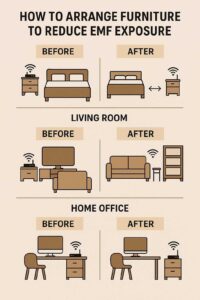
- Move the bed away from walls with electrical panels or smart meters. If your breaker box is on the other side of the wall, shift your bed at least 3–6 feet away. This keeps your head and torso out of the strongest field.
- Keep electronics off the nightstand. Don’t charge phones, tablets, or smartwatches near your head. If you must charge devices overnight, keep them at least 6–8 feet from the bed. A charging station across the room works best.
- Avoid placing the bed near Wi-Fi routers. Routers should be placed in central, low-traffic areas of the home, not in the bedroom. If yours is currently there, move it or at least keep the bed on the opposite side of the room.
- Use furniture as a buffer. Place a dresser, bookshelf, or wardrobe between your bed and an EMF source like a wall-mounted smart meter. While furniture doesn’t fully block EMFs, dense materials help reduce intensity.
Living Room Layout Tips
This room is trickier since entertainment electronics are often permanent fixtures. Still, you can reduce exposure with clever placement.
- Keep couches and recliners away from Wi-Fi routers. Position seating at least 5–6 feet away. If your router is in the living room, consider moving it to a hallway or higher shelf where people don’t sit nearby.
- Avoid sitting directly in front of large TVs. Modern flat screens emit lower radiation than older models but still give off EMFs. Sit at least 6–8 feet back, and if possible, place the TV against a wall where you don’t have bedrooms behind it.
- Rearrange to avoid clustered devices. Many homes put routers, gaming consoles, streaming boxes, and sound systems all in one entertainment hub. If possible, spread them out, and don’t place seating directly in front of that cluster.
- Use shelves or cabinets. Enclosing electronics in a wooden cabinet or entertainment center can slightly buffer EMFs and keep children from sitting too close.
Home Office Layout Tips
Here, your exposure is higher because you’re close to devices for hours. A thoughtful setup makes a huge difference.
- Don’t place your desk next to the Wi-Fi router. Move the router at least 6–10 feet away, ideally in another room. If you must keep it in the office, put it on a high shelf, not at desk level.
- Reposition power strips. Many people keep surge protectors right under their desk. That means your legs are soaking in EMFs all day. Move power strips to the far side of the room or mount them higher up on the wall.
- Arrange your desk so your back isn’t against a wall with wiring. If possible, angle your desk diagonally in the room so you aren’t sitting right up against wall current.
- Bundle cords and keep them away from your feet. A tangle of cords right under your chair increases exposure. Use cord clips to guide them along the wall or behind furniture.
Affiliate Advertisement

Furniture as a Shield: Creative Uses
Sometimes, you can’t move the EMF source itself. In that case, use furniture strategically to create a buffer.
For example, a tall bookshelf filled with books placed between your couch and the router won’t eliminate radiation, but it absorbs and scatters some of it. A heavy wooden dresser between your bed and the wall with the circuit breaker can lower exposure at night. Even a large plant stand or cabinet can provide minor shielding while enhancing your room’s design.
Combining Layout With Other EMF Reduction Methods
Rearranging furniture is powerful on its own, but when combined with simple EMF reduction tools, it becomes even more effective.
- Shielding curtains: If your bed must be near a window facing a cell tower, install EMF-blocking curtains to reduce outside radiation.
- Router covers: Mesh router guards lower emissions without cutting internet performance. Place these in combination with moving your seating away.
- Grounding mats: For desks or beds, grounding mats discharge excess electric fields from your body into the ground.
- Affiliate products (DefenderShield, EMF-Harmony): Phone cases, laptop pads, and device shields can protect you when electronics must remain close. Pair these with thoughtful furniture placement for layered protection.
By layering solutions, you’re not relying on one single change – you’re building a holistic defense.
Affiliate Advertisement

Step-by-Step Checklist for Getting Started
Before you dive in, it helps to have a clear order of action. Here’s a practical plan you can follow:
- Identify EMF sources. Walk around your home and note where routers, smart meters, breaker panels, and major electronics are located.
- Map out your high-use furniture. Beds, couches, desks, and chairs should be your first focus.
- Rearrange for distance. Shift these items at least 3–6 feet from EMF sources when possible.
- Add buffers. Use dressers, bookshelves, or cabinets between yourself and unavoidable sources.
- Test your setup. If you have an EMF meter, walk the room after rearranging. Notice how readings change.
- Layer other tools. Add shielding curtains, router guards, or grounding mats to fill in any gaps.
Following this sequence makes the process less overwhelming and ensures you cover the most important steps first.
Conclusion
Creating a healthier home doesn’t always require expensive equipment. Something as simple as rethinking your layout can have a powerful impact. Learning how to arrange furniture to reduce EMF exposure is about making smart choices – moving beds away from high-EMF walls, shifting desks from router hotspots, and creating buffers with shelves or cabinets. These steps not only protect your long-term health but also make your home feel calmer and more restful.
Try rearranging just one room this week and notice the difference. Over time, these small shifts build a safer, more EMF-conscious home environment for you and your family.
Before You Go…
Get Weekly EMF Protection Tips
Enjoy this article? Join the EMFLuLu newsletter for simple weekly tips to reduce everyday EMF exposure from phones, WiFi routers, laptops, and smart home devices.
Try Our Free EMF Calculators
Curious how much EMF exposure you may experience each day?
These simple tools can help you estimate your exposure and identify possible problem areas in your home.
Try these free calculators:
Like this article? Pin it on Pinterest!

More to Explore


